Reading the instrument panel
The live screen is built to be read in one glance from arm's length. Everything on it answers one of two questions: am I on time? and what do I do about it?
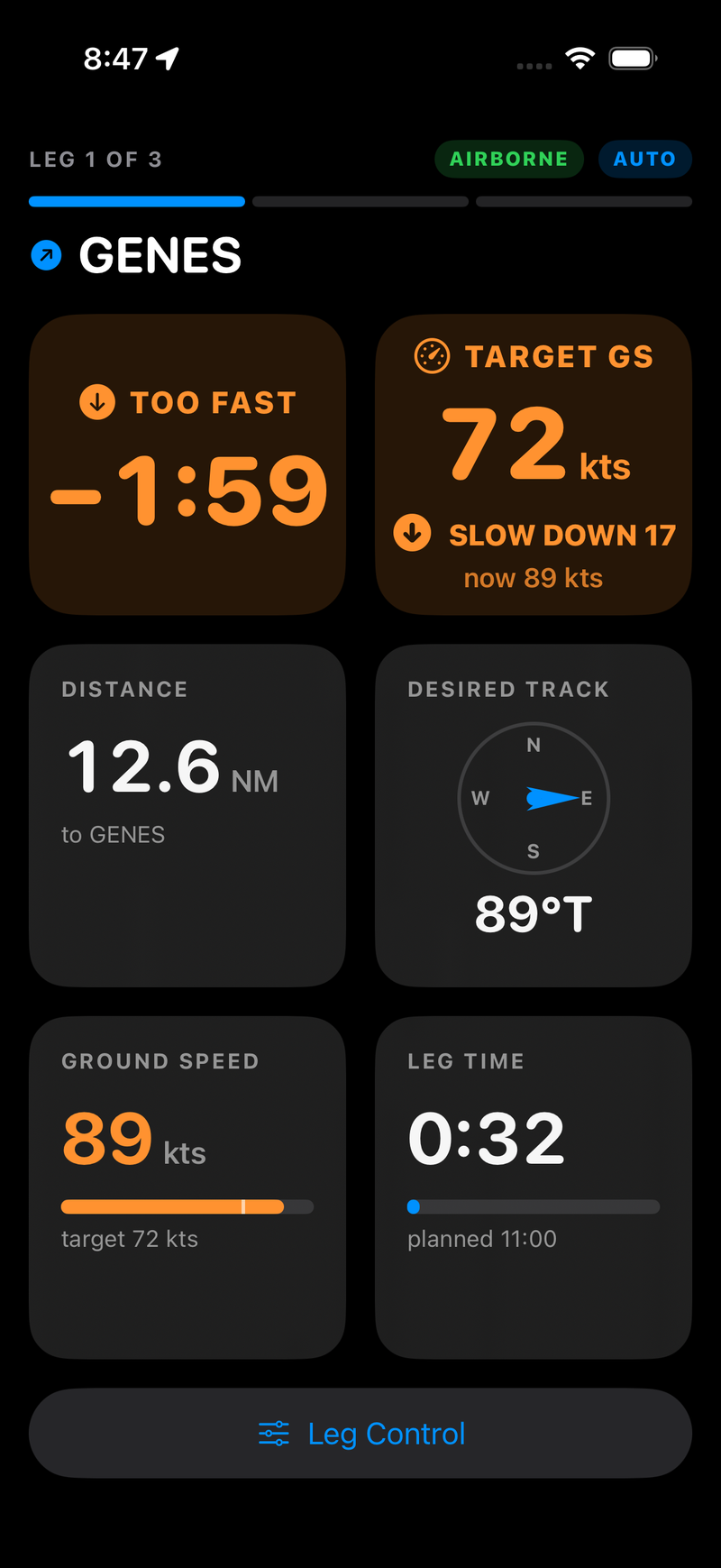
Running fast on leg 1: the delta card says TOO FAST −1:59, and Target GS turns that into an instruction — SLOW DOWN 17, from 89 knots to 72.
┌──────────────────────────────────────────────┐
│ LEG 2 OF 4        [AIRBORNE] [AUTO]          │  header
│ ▰▰▰▰▰▰ ▰▰▰▰▰▰ ▱▱▱▱▱▱ ▱▱▱▱▱▱                  │  leg progress
│ ↗ KJXN                                       │  next waypoint
├──────────────────────┬───────────────────────┤
│      ⬆ TOO SLOW      │  TARGET GS  SPEED UP  │
│        +0:24         │   128 kts  (+16)      │  hero row
│                      │      now 112 kts      │
├──────────────────────┼───────────────────────┤
│ DISTANCE             │ DESIRED TRACK         │
│ 7.4 NM               │      (compass)        │
│ to KJXN              │        073°T          │
├──────────────────────┼───────────────────────┤
│ GROUND SPEED         │ LEG TIME              │
│ 112 kts              │ 6:12                  │
│ ▰▰▰▰▰▰▰▰▱▱▱|▱▱       │ ▰▰▰▰▰▰▰▰▰▱▱▱▱         │
│ target 128 kts       │ planned 8:00          │
└──────────────────────┴───────────────────────┘
│              Leg Control                     │
└──────────────────────────────────────────────┘
On an iPad, or an iPhone in landscape, the four tiles lay out as a single wide row instead of a 2×2 grid. On an iPad there is also a sectional moving map below the gauges.
The header
LEG n OF m with a segmented bar underneath — one segment per leg, green for legs already flown, highlighted for the one you are on, grey for the ones ahead. Below it, the identifier of the waypoint you are currently flying toward.
The status pills tell you what state Navigator is in:
| Pill | Meaning |
|---|---|
| PRE-FLIGHT (orange) | Not airborne yet. Nothing is being timed. |
| AIRBORNE (green) | Timing is running. |
| AUTO (blue) | Automatic leg switching is armed. Its absence means you are switching legs by hand. |
| GDL90 (green) | A GDL90 source is selected and position reports are arriving. |
| GDL90: NO DATA (orange) | A GDL90 source is selected and fixes have stopped arriving — or none ever did. |
| NO GPS | Airborne, but no fix has arrived yet. |
| GPS LOST | No fix for 5 seconds. Both hero cards grey out and stop giving a verdict. |
| STAY IN APP | A GDL90 flight without location permission. Navigator must stay on screen or the receiver's fixes stop arriving. |
| MISSED <waypoint> · UNDO | A checkpoint was passed outside its radius. Tap to undo the switch — see legs advance by themselves. |
The delta card
The big number. It is the projected finish time of the current leg against its planned time — not the error so far, but where you will end up if you keep flying exactly as you are:
elapsed on this leg + (distance remaining ÷ current ground speed) − planned leg time
| Reading | Colour | Means |
|---|---|---|
| ON TIME | Green | Projected within ±3 seconds of plan. Change nothing. |
TOO SLOW +M:SS | Red | You will arrive that much late. Speed up. |
TOO FAST −M:SS | Orange | You will arrive that much early. Slow down. |
The sign follows clock convention: plus is late.
Because the projection uses your current ground speed, it moves around early in a leg — a few knots of variation over ten miles is a lot of projected seconds — and settles as you close on the waypoint. Fly the trend, not the twitch.
Distance
Great-circle distance in nautical miles from where you are to the next waypoint, with that waypoint's identifier underneath. It is direct distance, not distance along your intended course, so it decreases even when you are well off course.
Desired track
The initial great-circle bearing from your present position to the next waypoint, in degrees true, with a needle on a fixed dial.
Two things to keep straight:
- The dial is north-up and does not rotate. The needle points at the bearing to the waypoint in true degrees. It is not a heading indicator and not an HSI — it does not know which way the airplane is pointing.
- It is true, not magnetic. Apply your local variation before comparing it to anything in the panel.
Because it is recomputed from your present position, it is a direct-to bearing. Flying the needle takes you to the waypoint; it does not put you back on the original course line between the two waypoints.
Target GS
The second hero card, beside the delta card and the same size. Where the delta card tells you whether you are off plan, this one tells you what to do about it:
target = distance remaining ÷ planned leg time remaining
It shows the target in knots, the gap to it, your current speed ("now 112 kts") so you are comparing within one card rather than across the screen, and a verdict:
| Verdict | Means |
|---|---|
| SPEED UP (red) | You are projected late |
| SLOW DOWN (orange) | You are projected early |
| ON SPEED (green) | Within the on-time band |
Both take their direction and their on-time band from the same projected time error, so you will never see ON TIME next to SPEED UP. Colours are shared too — slow/late is red, fast/early is orange, on time is green — and the ground-speed tile follows the same rule.
Ground speed
Your current ground speed in knots, coloured by the same verdict as the hero cards, with a bar underneath marked at the target and the target spelled out below it ("target 128 kts").
When the numbers can't be trusted
Rather than show a confident wrong number, Navigator says what is wrong:
| State | Delta card | Target GS |
|---|---|---|
| Leg has no planned time | grey — | grey — |
| Past the planned leg time | red LATE +m:ss | red LEG TIME EXPIRED |
| GPS speed below 20 kts in the air | grey —, NO GROUND SPEED | target shown, CHECK GPS |
| No fix for 5 seconds | grey —, GPS LOST | grey —, GPS LOST |
| Target outside 0.6–1.4× your current speed | as normal | —, LATE · BEST SPEED or EARLY · EXTEND LEG |
That last row is the honest answer to a target no aeroplane can fly: once the required speed is wildly outside what you are doing, the leg is decided and a number would only mislead. Fly your best speed, or if you are early, extend the leg.
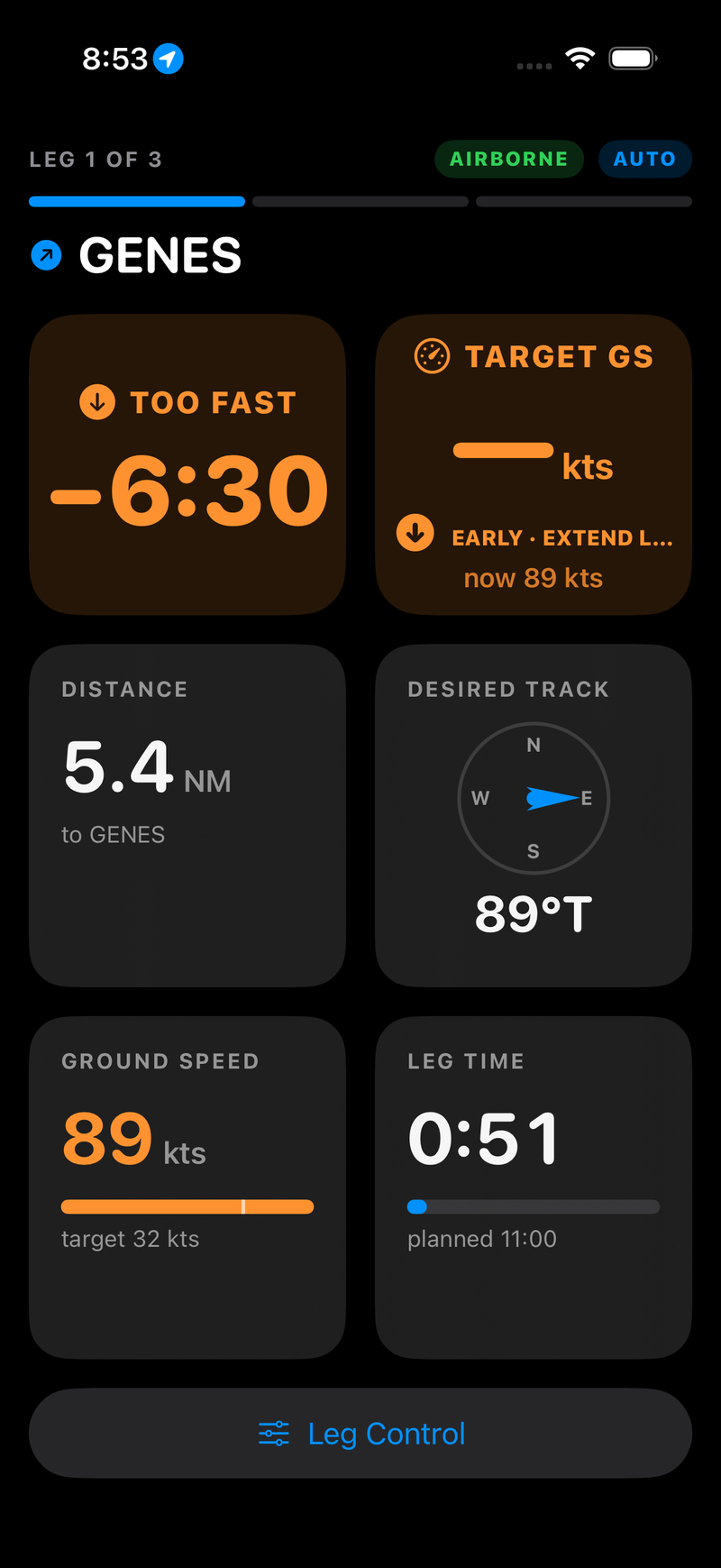
The last row of that table in practice. The leg needs 32 knots to come out on time, far below the 89 being flown, so Target GS drops the number and says EARLY · EXTEND LEG — while the delta card still reports the error normally.
The on-time band is entered within ±3 seconds and left only beyond ±6 seconds, so GPS speed noise doesn't flick the cards between colours while you hold a steady speed.
Leg time
Elapsed time on the current leg as M:SS, with a progress bar against the planned time and
the planned time spelled out underneath. The clock and the bar turn red the moment you
pass planned — a second signal, independent of the delta card, that this leg has run long.
A leg with no planned time — an unscored leg — shows the elapsed clock and "no planned time", with no bar.
Flying the panel
A workable scan for a scored leg:
- Delta card. Green? Nothing to do. Look at it again in thirty seconds.
- Not green? Read the Target GS card. SLOW DOWN 17 or SPEED UP 12 is the correction, in knots, already computed for you.
- Make the change small and early. A five-knot correction with eight miles to run buys back more time than a twenty-knot correction in the last mile — and it is far easier to be settled and stable at the checkpoint.
- Glance at distance to know how much runway you have left for the correction to work.
- At the checkpoint, expect the haptic and watch the header roll over to the next leg. A warning haptic and a MISSED · UNDO pill mean you passed outside the radius — tap it if that was deliberate. If nothing happens at all, take control by hand.